Plain English in.Beautiful designs out.
Describe what you want and your AI designs it in Make It Pretty™, a free design app for Windows and Mac. Ask Claude, ChatGPT, Gemini or Cursor inside the app or from your coding tool, then make it pretty on the canvas. No agent limits, no seats, no account.
Version 0.1.2. Signed installers for Windows 10 and 11, Apple silicon and Intel Macs.
 Make It Pretty™ AI
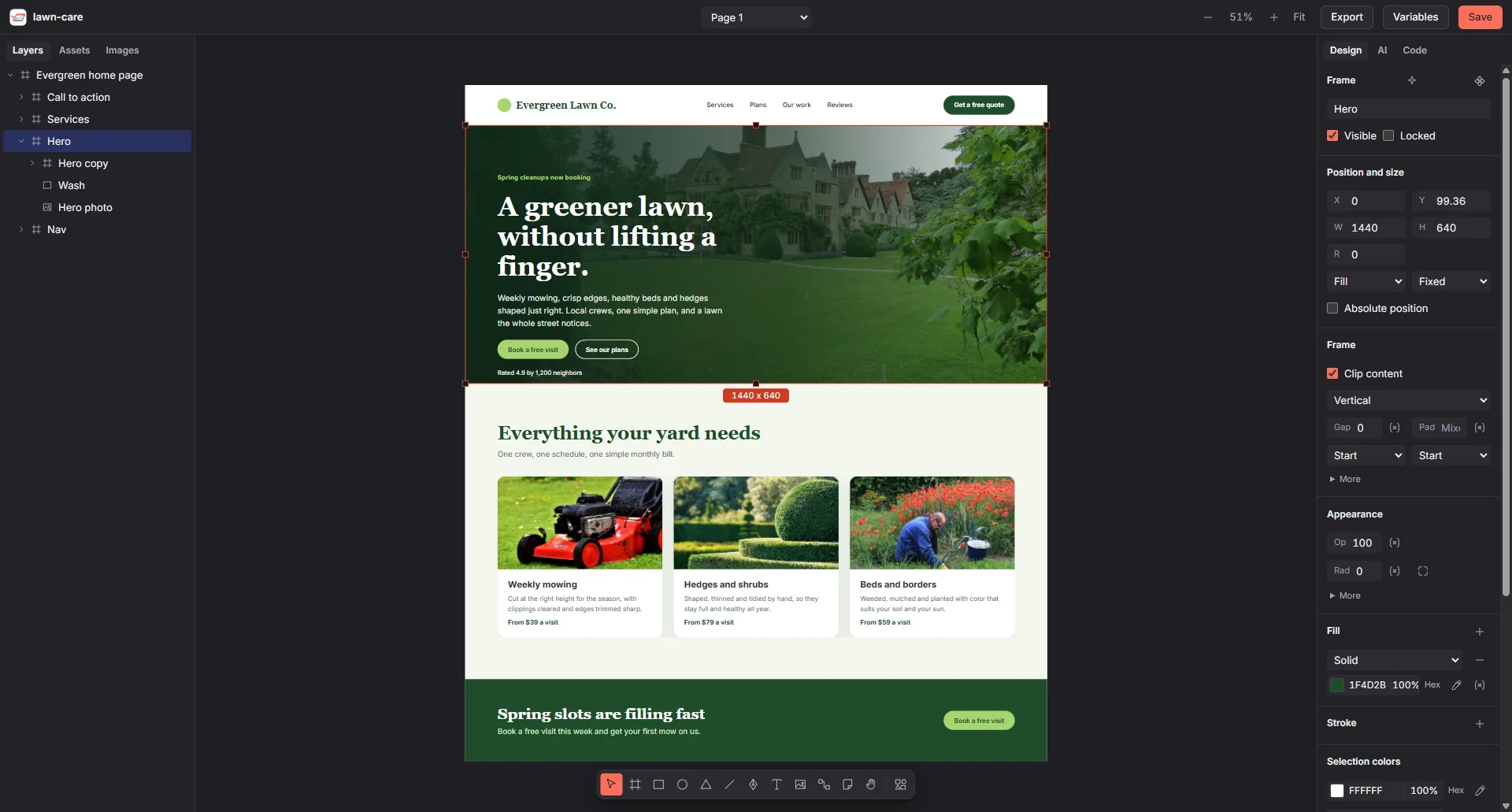
Design a home page for my lawn care business, Evergreen Lawn Co., with real photos.
On it. Here's what I'm doing:
- Choosing a fresh green look and a classic serif
- Adding a garden photo from Pixabay to the hero
- Laying out service cards with photos and prices
- Finishing with a booking banner
Done! Your home page is open in Make It Pretty™, photos and all.
Works with the AI you already use
- Claude Code
- Claude Desktop
- Codex
- Cursor
- Gemini CLI
- Ollama
- OpenRouter
- Amazon Bedrock
- Google Vertex AI
- Microsoft Foundry
Let your agent design as much as it wants
Other design tools now meter AI agents. Make It Pretty™ doesn't count agent days, generations or MCP calls. You pay for your own AI plan, and that's all.
- Paper free plan
- 100 MCP calls a weekPro raises it for $16 per editor a month.
- Figma Professional
- 200 MCP calls a dayWriting to the canvas needs a Full seat, from $16 a month.
- pen.dev free plan
- 5 agent days a monthYour own Claude Code, Codex or Cursor sessions count toward them.
- Make It Pretty™
- No limitEvery MCP tool, as often as your agent calls it, with or without the editor open.
Competitor limits are from their pricing pages in November 2026. See the full comparison for sources.
Connect your agent
35 MCP tools on one local server, ready for Claude Code, Codex, Cursor, Gemini CLI and Claude Desktop.
- Agents edit real files. They create documents, add frames, text, components and stock photos, check the layout and save. Their changes are outlined on the canvas until you accept them, and each one can be undone.
- You stay in charge. A new agent can only read until you allow its edits, and the activity log names every change it made.
- Works with the editor closed. Make It Pretty™ runs from the tray, so a coding agent can draw a screen while you're in your terminal.
- One click to connect. In the AI tab, open Settings and choose Claude Code, Claude Desktop, Cursor, Codex or Gemini CLI. The app shows the exact config change and backs the file up first.
Or add it by hand to any MCP client
Windows
{
  "mcpServers": {
    "make-it-pretty": {
      "command": "C:\\Users\\you\\AppData\\Local\\Programs\\Make It Pretty\\resources\\bin\\makeitpretty.exe",
      "args": ["--mcp"]
    }
  }
}
Mac
{
  "mcpServers": {
    "make-it-pretty": {
      "command": "/Applications/Make It Pretty.app/Contents/Resources/bin/makeitpretty",
      "args": ["--mcp"]
    }
  }
}
Replace "you" with your Windows user name.
Real photos and illustrations, right in your designs
Search Pixabay's free photos, illustrations and vector art without leaving the canvas. Pick one and it lands in your design, downloaded and fitted to the frame. Your AI agent does the same, so the screens it draws come with real pictures instead of gray boxes.
- No cost and no image cap. Pixabay's pictures are free, with no monthly count. Paper, Figma and pen.dev all meter their AI-generated images (see the comparison).
- Built into the app. No plugin and no extra setup for your agent. It searches, sees the thumbnails and places the picture through Make It Pretty™'s own tools.
- Find the right picture. Filter by photo, illustration or vector, by orientation and by color.
- Credit comes along. The author and source stay on the layer and go out with your exports.
- Pexels too. If you have a Pexels key, add it and search both sites at once.
Set it up in a minute
- Get a free API key from Pixabay.
- Paste it in Settings, Stock images, and press Test.
- Search in the Images tab, or ask your agent for "a hero photo of a mountain lake".
Pixabay's pictures are free to use, including commercially, under the Pixabay content license.
Just ask. Your AI drops it in.
Hero shots, illustrations, 3D art, backgrounds and more, built right into your AI designs through your own free Pixabay key. Your AI finds the right picture, places it and fits it to the layout, with no stock subscription and no per-image fees.
-
Photo
Hero photo
By jameswheeler on Pixabay
-
Photo
Team at work
By RonaldCandonga on Pixabay
-
Photo
Product flat lay
By StockSnap on Pixabay
-
Photo
Food
By Pexels on Pixabay
-
Illustration
Flat illustration
By Mohamed_hassan on Pixabay
-
Illustration
3D render
By u_m7v8kausho on Pixabay
-
Vector
Line art
By Heylizart on Pixabay
-
Vector
Geometric background
By DavidRockDesign on Pixabay
-
Vector
Isometric art
By ReSampled on Pixabay
-
Illustration
Watercolor
By tangjiao990 on Pixabay
AI inside the app, on your own plan
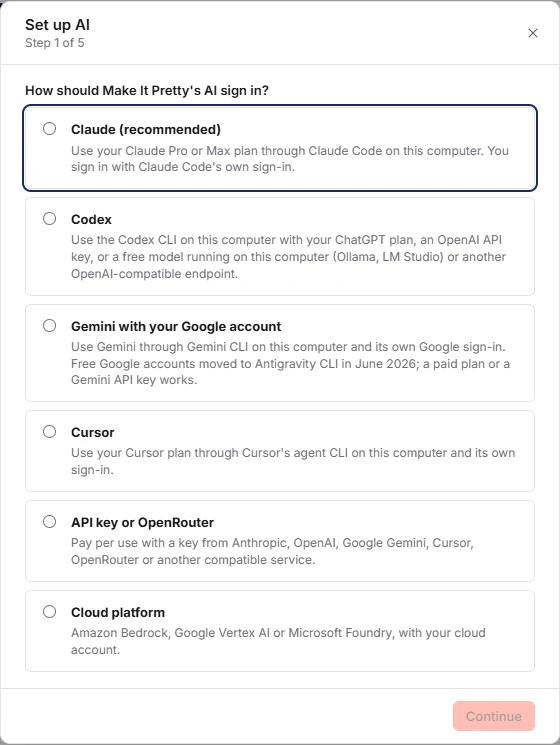
Ask for a screen or select layers and ask for a change. The AI tab signs in the way you already pay for AI, and a five-step setup walks you through it.
- Claude Pro or Max through Claude Code's own sign-in on your computer.
- ChatGPT through Codex, or an OpenAI API key.
- A free local model with Ollama or LM Studio. Nothing leaves your computer.
- Gemini, Cursor, OpenRouter or a cloud account on Bedrock, Vertex AI or Foundry.
Bring your files with you
Open the work you already have, then keep going with any agent you like.
From Figma
Open .fig files directly, paste frames copied in Figma, or import a file through the Figma API. Layers, text, components and pictures come across.
From pen.dev
Open .pen files with pen.dev installed on the same computer. Make It Pretty™ reads them through pen.dev's own app.
SVG and pictures
Drop in SVG, PNG, JPEG and WebP. SVG becomes editable vector paths.
From design to code
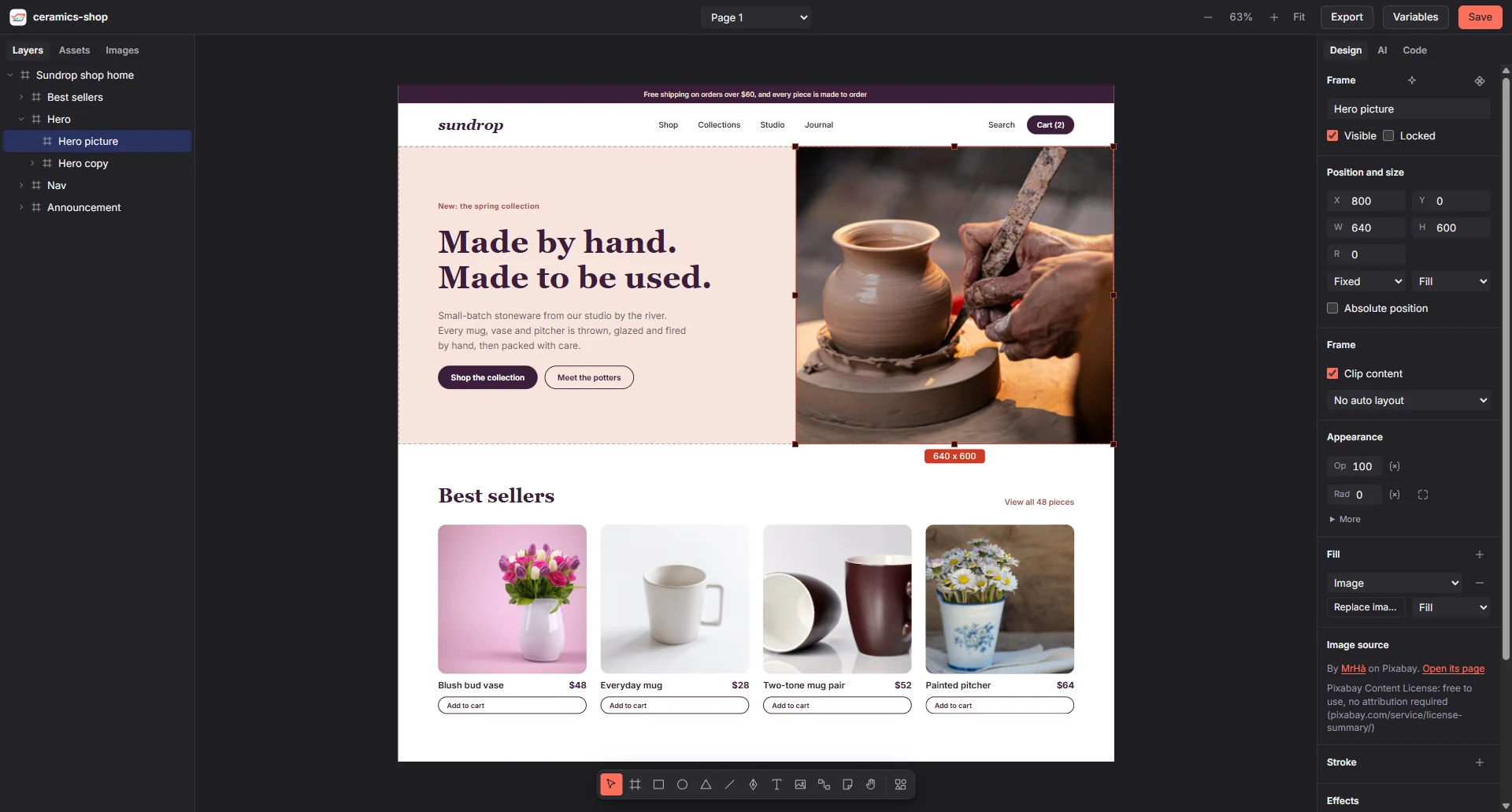
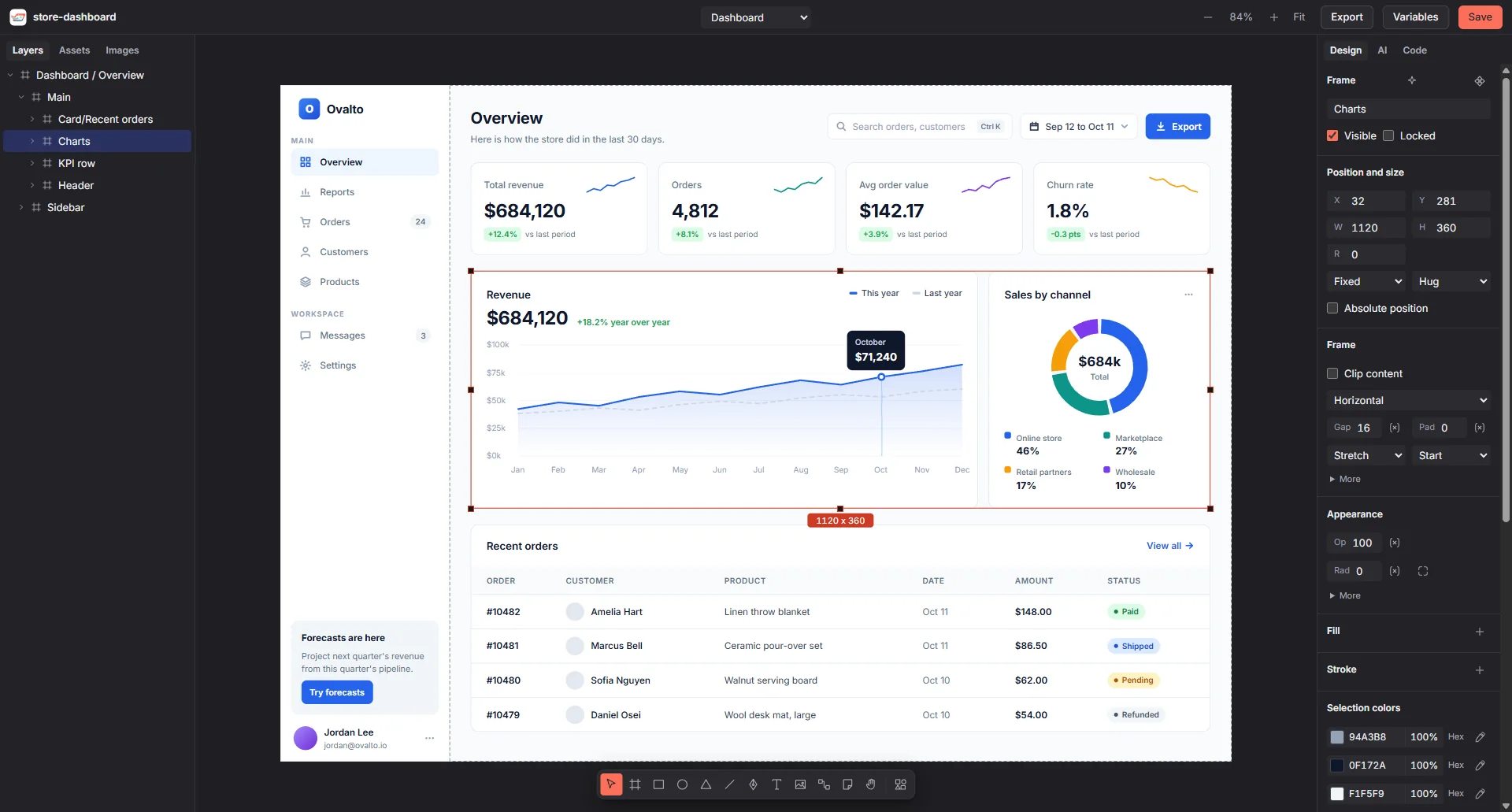
Select any frame and the Code tab writes it as HTML with CSS, HTML with Tailwind, or a React component, with picture credits kept as comments. Your colors and sizes come out as CSS variables or a Tailwind theme. Here is the real code for three of the designs above.
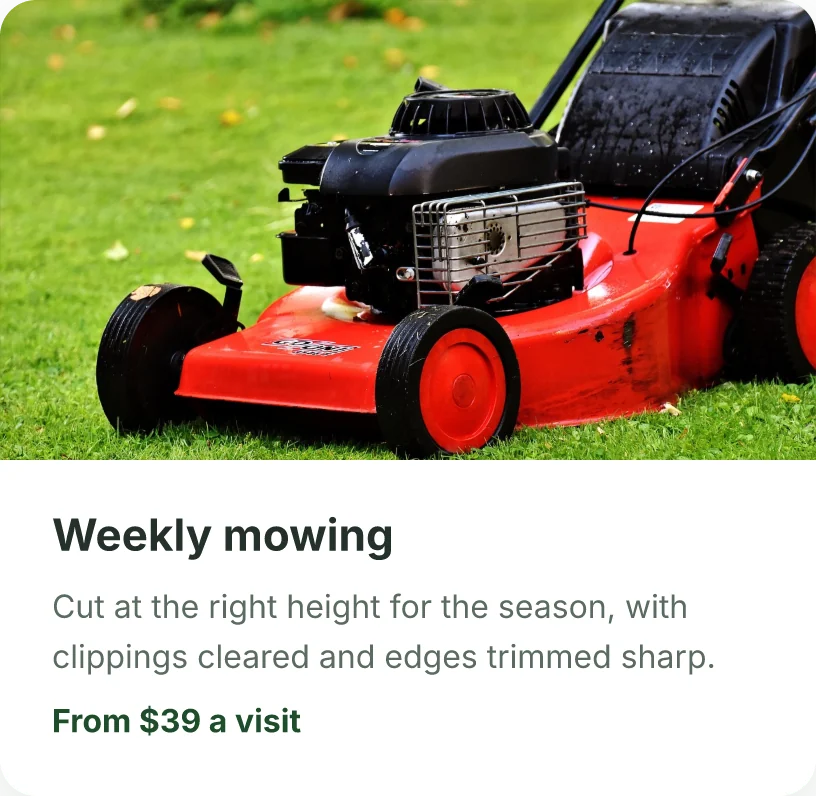
WeeklyMowing.tsxReact with Tailwind, written by Make It Pretty™
import "./WeeklyMowing.css";
export function WeeklyMowing() {
return (
<div className="relative flex flex-col justify-start items-stretch box-border rounded-[18px] overflow-hidden bg-[#ffffff] shadow-[0_10px_30px_0_#1f4d2b1f]" data-name="Weekly mowing">
<div className="h-[230px] shrink-0 self-stretch [background:url("./assets/a930ce0b413a62b5.jpeg")_center_/_cover_no-repeat]" data-name="Photo by Alexas_Fotos">
{/* Image: By Alexas_Fotos on Pixabay, https://pixabay.com/photos/lawn-mower-gardening-mow-cut-grass-2293876/ */}
</div>
<div className="shrink-0 self-stretch flex flex-col gap-[10px] justify-start items-start pt-[24px] pr-[26px] pb-[28px] pl-[26px] box-border overflow-hidden" data-name="Text">
<p className="shrink-0 m-0 [font-family:'Inter',_sans-serif] text-[22px] font-[700] leading-[26.62px] [font-optical-sizing:none] whitespace-pre text-[#24302a]" data-name="Text">{"Weekly mowing"}</p>
<p className="shrink-0 self-stretch m-0 [font-family:'Inter',_sans-serif] text-[16px] leading-[25px] [font-optical-sizing:none] whitespace-pre-wrap text-[#5b6b60]" data-name="Text">{"Cut at the right height for the season, with clippings cleared and edges trimmed sharp."}</p>
<p className="shrink-0 m-0 [font-family:'Inter',_sans-serif] text-[16px] font-[700] leading-[19.36px] [font-optical-sizing:none] whitespace-pre text-[#1f4d2b]" data-name="Text">{"From $39 a visit"}</p>
</div>
</div>
);
}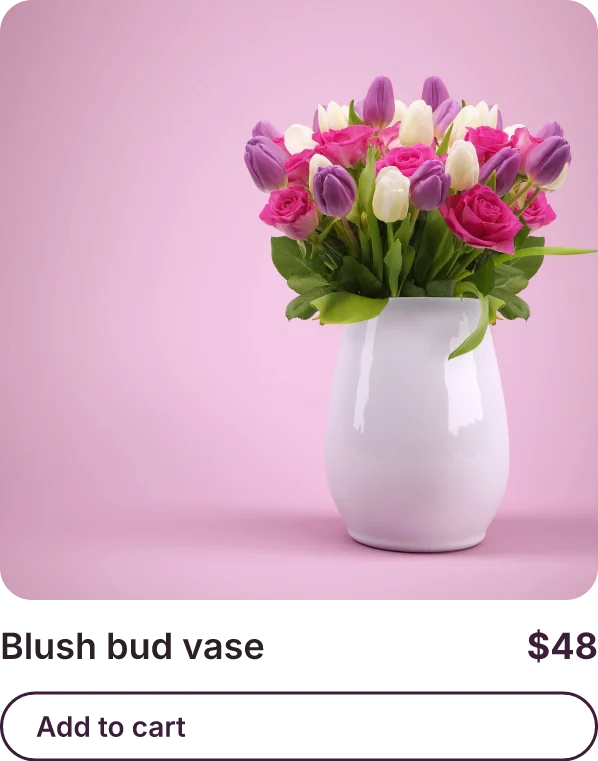
BlushBudVase.tsxReact with Tailwind, written by Make It Pretty™
import "./BlushBudVase.css";
export function BlushBudVase() {
return (
<div className="relative flex flex-col gap-[12px] justify-start items-stretch box-border overflow-hidden" data-name="Blush bud vase">
<div className="h-[300px] shrink-0 self-stretch rounded-[16px] [background:url("./assets/b1a8a19a7c97b786.jpeg")_center_/_cover_no-repeat]" data-name="Photo by Yuri_B">
{/* Image: By Yuri_B on Pixabay, https://pixabay.com/photos/bouquet-vase-flowers-flowerpot-3175315/ */}
</div>
<div className="shrink-0 self-stretch flex justify-between items-center box-border overflow-hidden" data-name="Row">
<p className="shrink-0 m-0 [font-family:'Inter',_sans-serif] text-[18px] font-[600] leading-[21.78px] [font-optical-sizing:none] whitespace-pre text-[#2b2028]" data-name="Text">{"Blush bud vase"}</p>
<p className="shrink-0 m-0 [font-family:'Inter',_sans-serif] text-[18px] font-[700] leading-[21.78px] [font-optical-sizing:none] whitespace-pre text-[#3b1f3a]" data-name="Text">{"$48"}</p>
</div>
<div className="shrink-0 flex justify-start items-center py-[9px] px-[18px] box-border rounded-[999px] overflow-hidden [outline:1.5px_solid_#3b1f3a] [outline-offset:-1.5px]" data-name="Button Add to cart">
<p className="shrink-0 m-0 [font-family:'Inter',_sans-serif] text-[14px] font-[600] leading-[16.94px] [font-optical-sizing:none] whitespace-pre text-[#3b1f3a]" data-name="Text">{"Add to cart"}</p>
</div>
</div>
);
}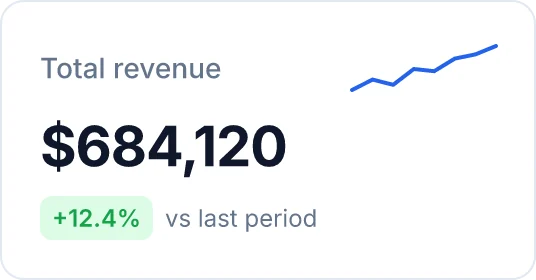
KpiTotalRevenue.tsxReact with Tailwind, written by Make It Pretty™
import "./KpiTotalRevenue.css";

export function KpiTotalRevenue() {
  return (
    <div className="relative flex flex-col gap-[8px] justify-start items-start p-[20px] box-border rounded-[12px] bg-[#ffffff] [outline:1px_solid_#e2e8f0] [outline-offset:-1px]" data-name="KPI/Total revenue">
      <div className="shrink-0 self-stretch flex gap-[8px] justify-between items-center box-border" data-name="Row">
        <p className="shrink-0 m-0 [font-family:'Inter',_sans-serif] text-[14px] font-[500] leading-[21px] [font-optical-sizing:none] whitespace-pre text-[#64748b]" data-name="Total revenue">{"Total revenue"}</p>
        <img className="w-[72px] shrink-0 h-[28px]" data-name="Sparkline" src="./assets/sparkline-1-79.svg" alt="Sparkline" />
      </div>
      <p className="shrink-0 m-0 [font-family:'Inter',_sans-serif] text-[28px] font-[700] leading-[34px] [font-optical-sizing:none] tracking-[-0.6px] whitespace-pre text-[#0f172a]" data-name="$684,120">{"$684,120"}</p>
      <div className="shrink-0 flex gap-[6px] justify-start items-center box-border" data-name="Row">
        <div className="shrink-0 flex justify-start items-start py-[2px] px-[6px] box-border rounded-[6px] bg-[#dcfce7]" data-name="Delta">
          <p className="shrink-0 m-0 [font-family:'Inter',_sans-serif] text-[12px] font-[600] leading-[18px] [font-optical-sizing:none] whitespace-pre text-[#16a34a]" data-name="+12.4%">{"+12.4%"}</p>
        </div>
        <p className="shrink-0 m-0 [font-family:'Inter',_sans-serif] text-[12px] leading-[18px] [font-optical-sizing:none] whitespace-pre text-[#64748b]" data-name="vs last period">{"vs last period"}</p>
      </div>
    </div>
  );
}- Export pictures as PNG, SVG, PDF, JPEG or WebP at any scale.
- Agents get code too. The same export is an MCP tool, so your coding agent can build the screen it just designed.
Close the window. Your agent keeps designing.
Make It Pretty™'s design engine is a small native program, separate from the editor. Close the editor and the engine waits in the system tray on Windows or the menu bar on a Mac, ready for the next call from your agent. You don't have to launch the app first, and your designs never pass through anyone's cloud to get there.
-
Designs with the editor closed
Agents create, edit, export and save files while no window is open. Open the file later, or keep it open and watch the changes arrive live.
-
Native speed
Layout, drawing, saving and export run as compiled Rust. The canvas runs the same engine in WebAssembly, so dragging and zooming never wait on another process.
-
Light enough to leave running
The tray program can start when you sign in and idles quietly. The full editor only runs while its window is open.
-
A private channel, no open ports
Agents reach the engine through a channel only your user account can open. There's no network port to find and no token file to steal.
-
The right file, every time
Every agent call names the document it means. Nothing is ever sent to whichever window happened to be in front.
-
Saves you can trust
Files are written to a temporary copy and swapped in whole, and a crash journal brings back unsaved edits the next time you open the file.
-
A locked-down editor
Sandboxed windows, a strict content security policy, and keys kept in your operating system's keychain instead of plain files.
-
Polite with your other tools
Connecting an AI client is your choice. The app shows the exact change, backs up the file first, and never touches its permission or allow-list settings.
-
Tested and signed
More than 1,500 automated tests run before every release, and every installer is code-signed, with the Mac version notarized by Apple.
A full design tool, not a demo
Everything you'd expect to draw with, and a few things you wouldn't.
-
Components and variables
Reusable components with overrides, and color, number and text variables with light and dark modes.
-
Auto layout
Rows, columns and wrapping with gap, padding, alignment and hug or fill sizing.
-
Pen tool and vectors
Draw paths with curve handles, then edit them point by point. Connectors and sticky notes too.
-
AI changes you approve
Edits from any AI are outlined on the canvas until you accept them, and the Changes list shows each one.
-
Templates and style guides
Start from a landing page, dashboard, mobile app, slide deck or social set, or add a ready style guide.
-
Icons
Search the full Lucide icon set and drop icons in as editable vectors.
-
Slides
Build a deck on the canvas and present it full screen.
-
Shader fills and script layers
Shader fills such as aurora, grain gradients and halftone, and script layers that draw charts, clocks and gauges from data.
-
Files that diff
.mkip files are plain text with one layer per line, so a design change reads like a code change in git.
-
Snapping and guides
Moving, resizing and drawing snap to nearby edges and centers with guides, plus an optional pixel grid.
-
Private by default
No account, no cloud and no telemetry. Your designs stay on your computer.
-
Updates itself
Signed and notarized installers, with updates checked against their signatures before they install.
Why Make It Pretty™
Other design tools were built for people and added AI later, then started metering it. Make It Pretty™ was built for you and your AI agent to design together from the start.
Download for free-
Your AI, unmetered
No agent days, MCP call limits or image caps. You pay for the AI plan you already have, and nothing else.
-
Real pictures at no cost
Pixabay photos, illustrations and vector art go straight into your designs, placed by you or by your agent.
-
Works with the window closed
The engine waits in your tray or menu bar, so agents design without the app open and without a trip through anyone's cloud.
-
Bring your work with you
Open Figma and pen.dev files, or paste frames straight from Figma.
-
From design to code
Every frame turns into HTML with CSS or Tailwind, or a React component.
-
Private and safe by design
No account and no telemetry, a private local channel, and signed installers on Windows and Mac.
Download Make It Pretty™
Free. Version 0.1.2.
Windows
Windows 10 or 11, 64-bit. Installs for your user, no admin rights needed.
Download for WindowsAll files and release notes are on GitHub.

Keep Make It Pretty™ free
Make It Pretty™ is free, and it stays free. Building and maintaining it takes real time and money. If it saves you time, a donation keeps it going, and a star on GitHub helps other people find it.
Payments are handled by Stripe. Make It Pretty™ never sees your card.
★ Star on GitHub